
Connecting Power BI to Trino
This guide shows how each Microsoft Power BI product connects to Trino on the Stackable Data Platform (SDP).
There are two ways to connect them:
-
the Stackable ODBC driver for Trino, which ships with a Power Query connector that adds Stackable Trino to the Get Data dialog, and
-
the Stackable PostgreSQL-to-Trino gateway, which runs in Kubernetes next to Trino and accepts PostgreSQL connections, so Power BI’s built-in PostgreSQL connector can query Trino.
|
Both are open source, and neither is part of SDP. Stackable support doesn’t cover them. If you need commercial support for either of them, contact us. |
Which one you need, and where you install it, depends on the Power BI product you run.
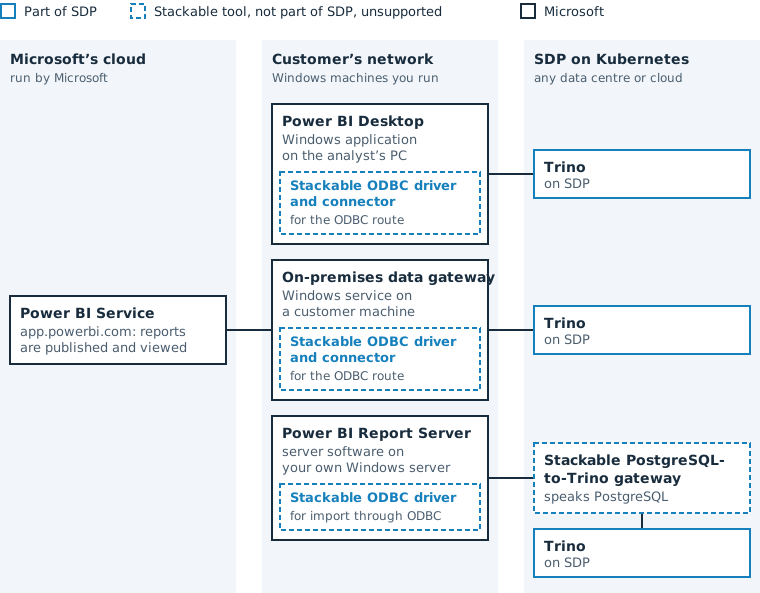
Choose a route
|
Power BI loads data in one of two modes. Import copies the data into the Power BI model at each refresh, and reports query that copy. DirectQuery leaves the data in Trino and sends a query to Trino for every report interaction. |
| You run | Import | DirectQuery | You install |
|---|---|---|---|
Power BI Desktop |
ODBC driver (recommended) or PostgreSQL-to-Trino gateway |
ODBC driver (recommended) or PostgreSQL-to-Trino gateway |
Either
|
Power BI Service (cloud) |
ODBC driver (recommended) or PostgreSQL-to-Trino gateway |
ODBC driver (recommended) or PostgreSQL-to-Trino gateway |
Microsoft’s on-premises data gateway on a Windows machine, and either
|
Power BI Report Server |
ODBC driver or PostgreSQL-to-Trino gateway |
PostgreSQL-to-Trino gateway |
Either
|
Where both routes work, the ODBC driver is the recommended one, because the connector sends Trino SQL straight to Trino. The PostgreSQL-to-Trino gateway adds a component in Kubernetes and has to rewrite the PostgreSQL that Power BI generates into SQL that Trino parses.
Every route needs Trino reachable from the Windows machine that runs the Power BI component: the analyst’s PC, the data gateway machine or the Report Server. Connecting to Trino covers the Trino side: endpoints, TLS and authentication.
Power BI Desktop
Power BI Desktop is a Windows application on the analyst’s PC. It queries Trino directly from that PC, without Microsoft’s cloud in the path.
-
Download the Windows archive from the releases page, unzip it and run
install.batas administrator. -
Copy
StackableTrinoODBC-<version>.mezinto%USERPROFILE%\Documents\Power BI Desktop\Custom Connectors\. -
In File > Options and settings > Options > Security, allow any extension to load, then restart Power BI Desktop.
-
Select Get Data, choose Stackable Trino, and enter the Trino coordinator’s server, port and catalog.
Each analyst connects with their own Trino credentials, or with Trino’s browser login when External authentication is enabled in the connector’s advanced options.
To use the PostgreSQL-to-Trino gateway instead, deploy it as described in PostgreSQL-to-Trino gateway and connect with Power BI’s built-in PostgreSQL database connector.
Power BI Service
The Power BI Service runs in Microsoft’s cloud and reaches Trino only through Microsoft’s on-premises data gateway. The data gateway is a Windows service that you install on a machine that can reach Trino. The data gateway talks to both the Power BI Service and Trino, and passes queries and results between them.
-
Install the on-premises data gateway on a Windows machine that can reach Trino.
-
Install the Stackable ODBC driver on that machine, as for Power BI Desktop.
-
Copy the
.mezconnector into a folder that the data gateway’s service account can read, and select that folder under Connectors in the data gateway app. -
In the Power BI Service, enable custom connectors in the gateway cluster’s settings and add a Stackable Trino data source with the credential Trino should see.
Use custom data connectors with the on-premises data gateway covers the Microsoft side of steps 3 and 4.
Every viewer’s queries run as the data source’s stored credential, so Trino’s access rules see one user for all viewers. Per-user restrictions have to be Power BI row-level security. A DirectQuery model can use only one custom-connector data source, and Kerberos with Windows authentication isn’t available for custom connectors through the data gateway.
If the data gateway machine must not run custom connectors or third-party drivers, use the PostgreSQL-to-Trino gateway instead. The data gateway’s built-in PostgreSQL connector then needs no Stackable software on that machine.
|
Single sign-on isn’t available
Power BI’s single sign-on through the data gateway, which runs each viewer’s queries under their own identity, isn’t available for Trino. Microsoft enables it per connector in the Power BI Service and doesn’t enable it for custom connectors such as Stackable Trino. Since September 2025, Microsoft builds new connectors itself and no longer certifies connectors from partners (announcement). |
Power BI Report Server
Power BI Report Server is server software on your own Windows server. It queries Trino without Microsoft’s cloud in the path. It allows DirectQuery only for a short list of data sources that includes PostgreSQL but not ODBC, and it doesn’t refresh reports that use custom connectors.
That’s why Stackable built the PostgreSQL-to-Trino gateway: Report Server sees a PostgreSQL database and gets DirectQuery against Trino.
-
For import and DirectQuery, deploy the PostgreSQL-to-Trino gateway and use the built-in PostgreSQL database connector with user and password.
-
For import only, install the Stackable ODBC driver on the Report Server, create a DSN for Trino with ODBC Data Sources (64-bit), and use the built-in ODBC connector.
PostgreSQL-to-Trino gateway
The gateway runs in Kubernetes next to Trino and accepts PostgreSQL connections on port 5432.
It forwards queries to Trino and returns the results over the PostgreSQL protocol.
Most queries pass through unchanged, and the gateway rewrites the PostgreSQL constructs that Trino doesn’t parse, such as :: casts and ILIKE.
Install its Helm chart with the Trino coordinator’s host and port, and make its Service reachable from the machine that runs the Power BI component.
The chart’s README covers authentication and TLS.
The gateway runs as a single replica, because a PostgreSQL cancel request has to reach the replica that holds the connection.